 NativTap
Before you begin
- Your app lets shoppers start deleting their account inside the app by default, so you have nothing to set up. The section See what a shopper goes through gives Apple's rule behind it.
- The Delete account row shows only to a signed-in shopper in your app, not in the preview app.
- Nativtap asks Shopify to erase the shopper. Shopify finishes the deletion, so the time it takes is Shopify's.
- You can't start, stop or speed up a request.
Follow a request in Nativtap
- From your Shopify admin, go to Nativtap > App submission > Manage App Store.
- Select the Deletion requests tab.
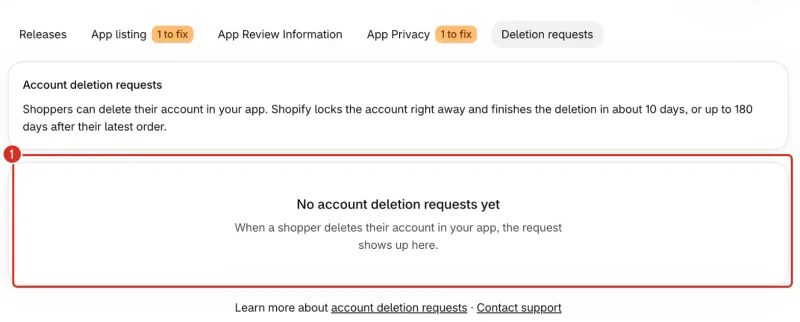
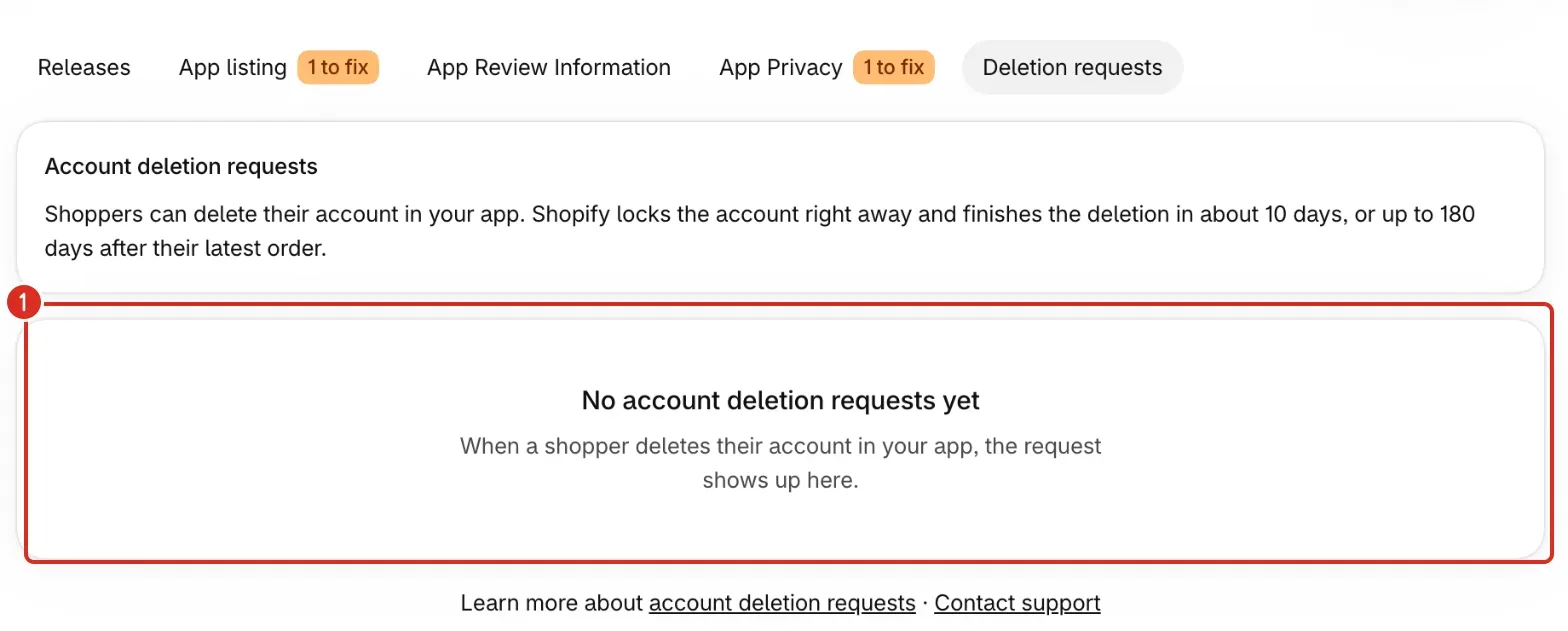
- Read the cards under the tabs. If you see No account deletion requests yet, no shopper has deleted an account in your app.
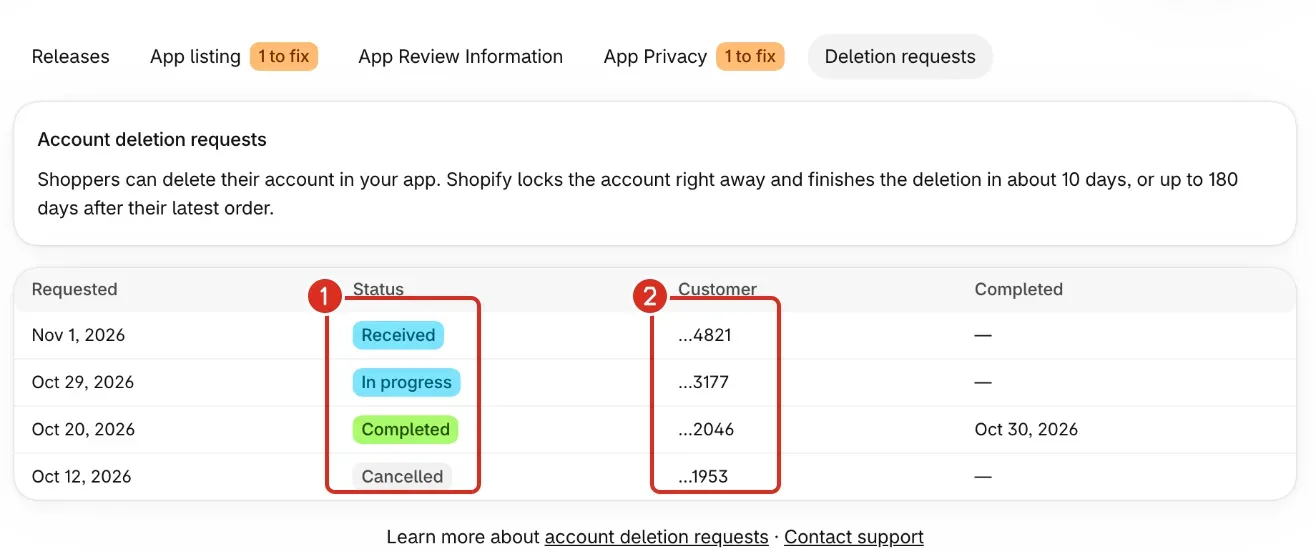
- Read the table. Each row is one request, and the newest is first. The columns are Requested, Status, Customer and Completed. Completed shows a dash until the request is done.
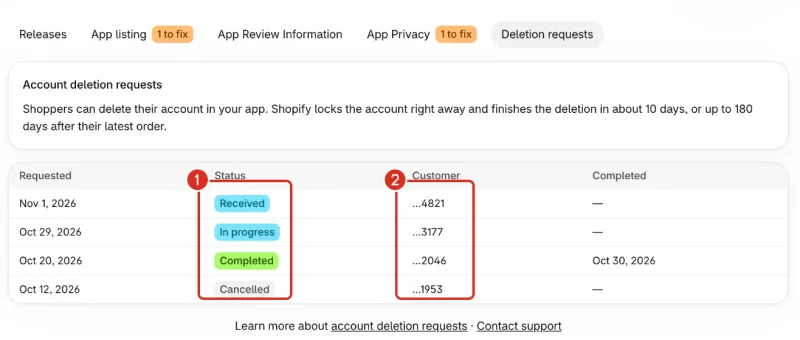
1: Status. 2: Customer, only the last digits. - Select Load more under the table to see older requests. It shows when there are more than 50 requests.
Read the status of a request
Each row shows one of five statuses.
| Status | What it means |
|---|---|
| Received | Nativtap has the request and Shopify hasn't accepted it yet. |
| In progress | Nativtap asked Shopify to erase the shopper. Shopify is finishing it. |
| Completed | Shopify finished, or the shopper no longer exists in Shopify. The Completed column shows the date. |
| Failed | Nativtap's request to Shopify did not succeed. See “A request shows Failed” under Common problems. |
| Cancelled | The request was cancelled before it finished. The shopper's app reads it as failed. |
The Customer column shows “…” and the last four digits of the shopper's Shopify customer ID, for example …4821. It is a reference to quote to support. It never shows a name or an email.
A request leaves the list 30 days after it closes.
See what a shopper goes through
Apple requires an app that supports account creation to let people start deleting their account inside the app (Apple's account deletion guideline 5.1.1(v)). Your app does this by default.
The shopper opens the Account page of your app and selects Delete account. The app then explains what happens:
- The app says the account is locked right away.
- The app says it erases the shopper's name, email, addresses and wishlist.
- The app says past orders stay with the store, without the shopper's personal details.
- The app says erasure usually takes about 10 days, and up to 180 days after the latest order if the shopper ordered in the last 180 days.
The shopper selects Delete my account, then selects Delete my account again in the Delete your account? dialog. The app shows We received your request. Your account is locked and you are signed out. The shopper selects Done.
Check what the shopper sees when a request ends
The app checks the request each time the shopper opens it. When the request has ended, the app shows an alert titled Account deletion once, and the shopper selects OK.
- Completed: Your account at your shop name has been deleted.
- Failed or Cancelled: We couldn't finish deleting your account at your shop name. Please contact the store.
The app shows no alert when Nativtap no longer has the request, which happens 30 days after it closes.
Add the process to your privacy policy
The privacy policy text on the App Privacy tab explains how shoppers delete their account in the app. Copy it into your store's privacy policy. Answer App Privacy shows where.
Common problems
- No account deletion requests yet
- No shopper has deleted an account in your app. When one does, the request shows up here. Deleting an account from the preview app isn't possible, because it doesn't offer Delete account.
- Couldn't load account deletion requests
- The page also says The rest of this page still works. Reload the page to try again. Select Reload page. If it keeps failing, read Contact support.
- A request shows Failed.
- Nativtap's request to Shopify did not succeed. The shopper's app tells them to contact the store. The request can still change to Completed if Shopify erases the shopper anyway. If it stays Failed, follow Contact support and send the request date and the customer reference from the Customer column.
- A request is still In progress after more than 10 days.
- Shopify finishes the erasure. Nativtap's text says it takes about 10 days, and up to 180 days after the latest order if the shopper ordered in the last 180 days. Nativtap checks open requests about once a day and sets them to Completed when the shopper is gone from Shopify.
- Account deletion is switched off for your app right now. Apple requires it in apps with sign-in. Contact Nativtap support, or try again later.
- This line appears in Before you submit on the Releases tab and blocks Submit for review. Account deletion is on by default, and only Nativtap can switch it off. Contact support.
- A shopper can't find Delete account.
- The row shows only on the Account page of your app, and only when the shopper is signed in. It is hidden for a guest and in the preview app. It is also hidden if Nativtap switched account deletion off for your app.
- The shopper sees “Couldn't send your request. Please try again.”
- The app couldn't finish sending the request. The shopper selects Delete my account again. A second try doesn't create a second request while the first one is open.
- The shopper sees “Please sign in again”
- The shopper's session ended. The app opens the sign-in sheet. After signing in, the shopper selects Delete my account again.
Related
Something wrong or out of date on this page? Tell us by email.
Still stuck?
Send us the exact message you see, and what you already tried.